OBD-II scanner · free download

Download the AvtoElektrik PRO scanner

One scanner, three options: an Android phone with a Bluetooth adapter, a Windows computer with Scanmatik or another J2534 adapter, and the online version on iPhone and in the browser. Codes decoded in Russian, Kazakh and English, live data with normal values, tips from an auto electrician. Free.

Download the AvtoElektrik PRO scanner
3 optionsphone, computer, online
$0the app and the program are free
J2534Scanmatik 2 PRO and Scanmatik 3
3 languagesRussian, Kazakh, English

Which option to choose

For drivers and mechanics

Android phone + Bluetooth adapter

The adapter in the OBD-II port under the dashboard, the phone in your hand: engine, ABS, airbag and transmission codes, live data, a pre-purchase check, a PDF report.

  1. Download and install the app.
  2. Plug in the adapter and turn the ignition on.
  3. Open “Scanner”, choose the adapter type and tap “Connect”.
Oleg recommends the vLinker MC+ (Vgate) adapter. Other ELM327 adapters over Bluetooth, Bluetooth LE and Wi-Fi work too.
For mechanics

Windows computer + Scanmatik

The program connects the app to J2534 adapters: Scanmatik 2 PRO, Scanmatik 3 and others whose driver is installed in Windows. Scanmatik 3 also works over CAN FD; newer BMW, VW, Mercedes, Volvo and Jaguar Land Rover over DoIP with an ENET cable; trucks over J1939.

  1. Download the program and run the file — the app opens in your browser.
  2. Close the Scanmatik software: the adapter works with one program at a time.
  3. Connect the adapter to the car and the computer, turn the ignition on and click “Find adapters”.
16 MB file, Windows 10 and 11. Read and clear codes only: no writing to modules, no coding, no flashing.
Try it

iPhone and browser

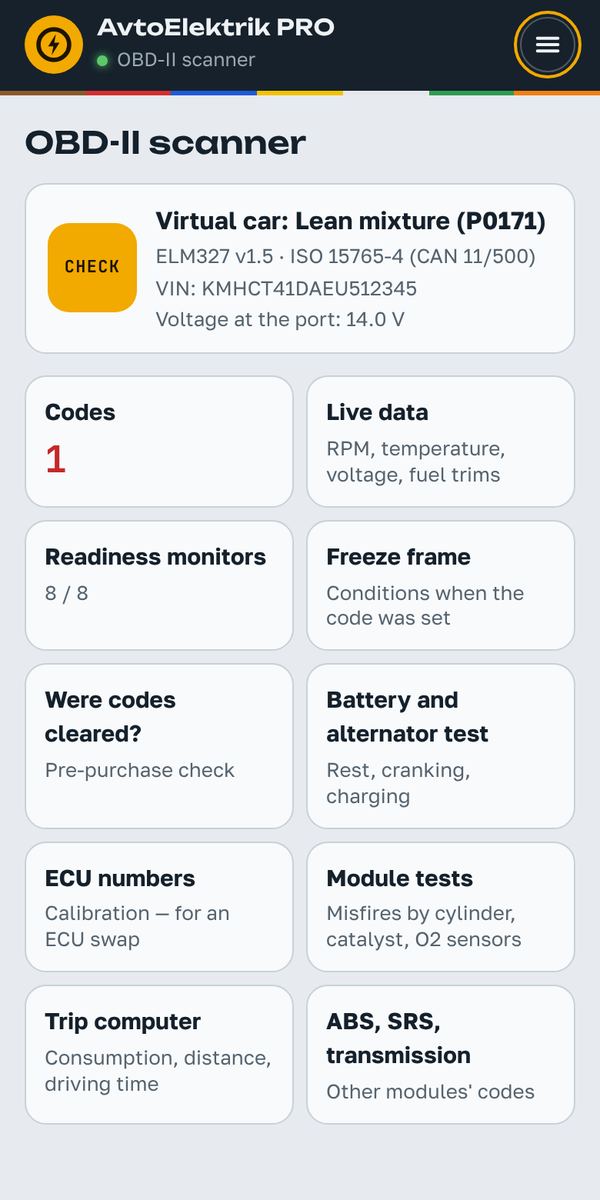
The online version opens from a link: codes decoded, tips, sensor values and the scanner on a virtual car. You can’t connect to an adapter from an iPhone or a browser — that needs Android or a computer.

  1. Open help.avtoelektrik-pro.kz in Safari.
  2. Tap Share and choose “Add to Home Screen”.
No sign-up; opens with one tap from the home screen.
For trucks

24 V trucks (J1939)

Trucks are read over J1939: with the Windows program and Scanmatik, or with a Bluetooth adapter in trial mode.

  1. A 12 V adapter (vLinker MC+ and most ELM327s) only through a 24→12 V converter.
  2. A 24 V socket has a split in the middle key: a 12 V plug with a solid key won’t fit into it.
  3. Car-type socket on a 24 V system — don’t plug in directly.
Scanmatik connects to a truck without a converter.

What the scanner does

More about the scanner, with screenshots →

Oleg’s tips on adapters

Questions

Is the scanner free?

Yes. The Android app, the Windows program and the online version are free, with no sign-up. You only need an adapter.

Does it work with Scanmatik 3 and CAN FD?

Yes: the Windows program tries CAN FD on its own after regular CAN, and reads newer cars with DoIP through the Scanmatik 3 network port or an ENET cable. This is a new feature: if a car doesn’t read, send the program log (scanmatik.log) to Oleg on WhatsApp and we’ll sort it out.

Can the scanner damage a module?

No. The app and the program only read data and clear codes with standard commands. The Windows program has an allow list: writing to modules, coding and flashing never reach the car.

Why does Windows show a warning when I run it?

The program is new and Windows doesn’t know it yet. Click “More info” → “Run anyway”. Download the program only from this site.

Does it work on iPhone?

On iPhone the online version works: fault codes, tips and the scanner on a virtual car. Connecting to an adapter is in the Android app or on a computer with Scanmatik.
Who made it

The app was made by Oleg Dmitriev, an auto electrician from Almaty with 26 years of experience. The scanner’s tips come from his practice.